The Series 3 covers two very different sides of the industry.
You have market terms and calculations on one side, then rules and regulations on the other. Series 3 study material can explain one side well and still leave you struggling with the rest.
I went inside the top Series 3 courses and used their lessons, practice questions, exams, tracking features, and support tools myself. Some gave me plenty of freedom. Others stayed involved and told me exactly what to do next. Here is how each one actually handled the studying.
Top Series 3 Prep for Different Study Styles
Each course had its own idea of how much structure a student needs.
- Best Complete Series 3 Course: Securities Institute of America – I could move between its video lessons, textbook, custom quizzes, and Greenlight Exam without needing anything extra.
- Best for Traditional Instructor Support: STC – Its manuals, lectures, instructor hotline, and higher-level class option gave me several ways to get help.
- Best for Custom Practice Sessions: Kaplan – The QBank let me control the topics, question count, and quiz format whenever I wanted to work on a weak area.
- Best for Guided Online Studying: ExamFX – Its study plan, SpotCheck Quizzes, checkpoints, and final exams kept my sessions moving in a clear order.
- Best for Personal Accountability: Knopman Marks – The onboarding call, progress monitoring, study emails, and faculty contact made it feel like someone was keeping an eye on my progress.
| Best Series 3 Course Comparison Chart | ||
 |
| GET STARTED |
 |
| GET STARTED |
 |
| GET STARTED |
 |
| GET STARTED |
 |
| GET STARTED |
Best Series 3 Study Materials: Behind the Scenes
Below, you’ll see exactly how I moved through each course, from the dashboards and study features to my final ratings. Let’s begin.
1. Securities Institute of America (SIA): Best for Customizable Practice

The first thing I noticed after logging into SIA was how much was sitting on the dashboard. I had exams, reports, videos, calendar assignments, and question filters competing for my attention. It took me a minute to learn where everything was, but I eventually stopped following one fixed path. A normal session could start with the matching video and section test, then turn into a custom exam made only from questions I had already missed. That freedom was the real reason I ranked SIA first. The platform was not the cleanest I tested, but it gave me more control over what happened after I got something wrong.
900-Question Test Bank
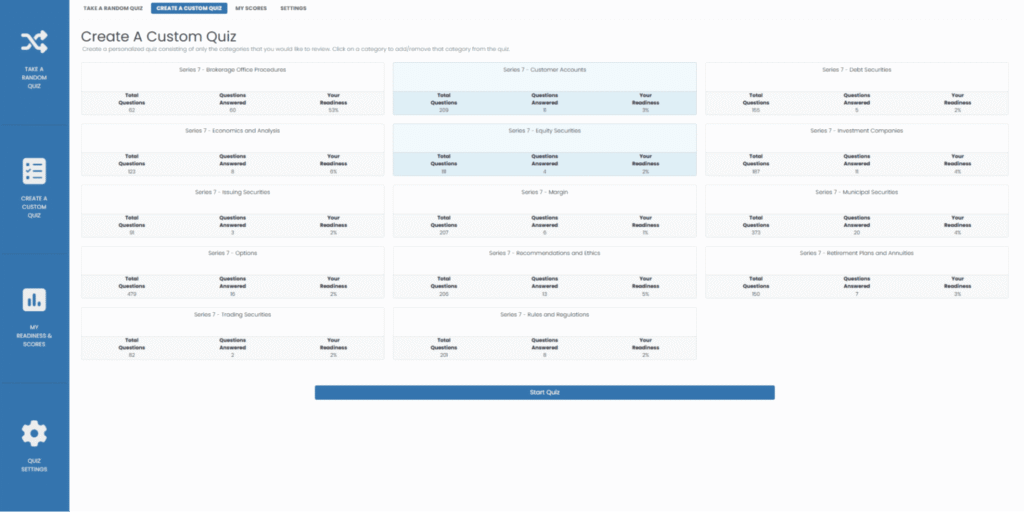
The Test Bank did more than let me choose a topic and question count. I could control when the answers appeared and build an exam from unseen, incorrect, or marked questions. I used the incorrect-question filter the most because it pulled my missed questions into one place instead of making me search through old attempts.
I could also add notes directly to questions when the explanation included something I wanted to remember. Once I submitted an exam, the report separated my results by category, so I could see which section actually hurt my score. My only issue was the setup. With 15 customization options, starting a simple quiz sometimes took more clicking than it needed to.
Video Lessons and Section Tests
SIA’s videos followed the textbook in the same order, so I did not have to guess which lecture matched the chapter I had just read. I could finish part of the 228-page manual, open the related video, and take its section test before moving forward. The Complete course included nine hours of instruction split across 14 videos and section tests, which made the video library feel manageable.
I also used the Test Bank afterward when the section test showed that I needed more practice. That chapter-to-video-to-test order was easy to repeat. The videos were still tied closely to the textbook, though, so they did not feel like a completely different way of learning the material.
Greenlight Exam and Reports
I did not open the Greenlight Exam just to get another early score. I used the unlimited randomized finals first because I could keep practicing without using the course’s main readiness check. After I opened Greenlight, the report gave me my total score, category scores, every answer I selected, and the explanation for each question. That made it more helpful than a screen that only said pass or fail.
I could return to the Test Bank and build my next exam from the categories or incorrect questions that showed up in the report. The Greenlight Guarantee sounded good, but I would still read its requirements before treating the exam like an automatic refund.
Read my full SIA review to see what the course was actually like behind the dashboard.
Securities Institute of America Packages
| Package | What’s Included | Best For | Price |
|---|---|---|---|
| Complete Exam Prep Course | Physical textbook and eBook, 228-page manual, nine hours of video, 14 videos and section tests, 900-question Test Bank, reports, unlimited exams, calendar, test-tips video, cheat sheets, and free shipping | Using the full study system | See Pricing |
| Textbook & Exam Prep Test Bank | Physical textbook and eBook, 900-question Test Bank, 15 customization options, unlimited exams, Checkpoint and Greenlight Exams, calendar, cheat sheets, and free shipping | Reading followed by heavy practice | See Pricing |
| Video Course & Practice Exam Package | Nine hours of video, 14 section tests, 900-question Test Bank, unlimited exams, Checkpoint and Greenlight Exams, test-tips video, and cheat sheets | Video lessons without the manual | See Pricing |
SIA Course Ratings
| Aspect | Rating |
|---|---|
| Content Quality | 9.4 / 10 |
| Practice Question Bank | 9.7 / 10 |
| Adaptive Learning Technology | 9.1 / 10 |
| Instructor Quality | 8.7 / 10 |
| Pricing and Value | 9.5 / 10 |
| Student Support | 9.4 / 10 |
| Overall Average | 9.3 / 10 |
Pros
✅ The calendar built assignments around my exam date
✅ Checkpoint Exams added another step before Greenlight
✅ Cheat sheets made final review much quicker
✅ Support was available by phone, email, and chat
Cons
❌ The dashboard took time to figure out
❌ Video lessons were recorded with no live class option
❌ May feel too complete if you need a light review only
Is It Right for You?
SIA is perfect for building custom practice around exactly what you missed. The dashboard takes a minute to learn, but the exam controls and reports make it worth figuring out.
2. Securities Training Corporation (STC): Best for Live Series 3 Classes
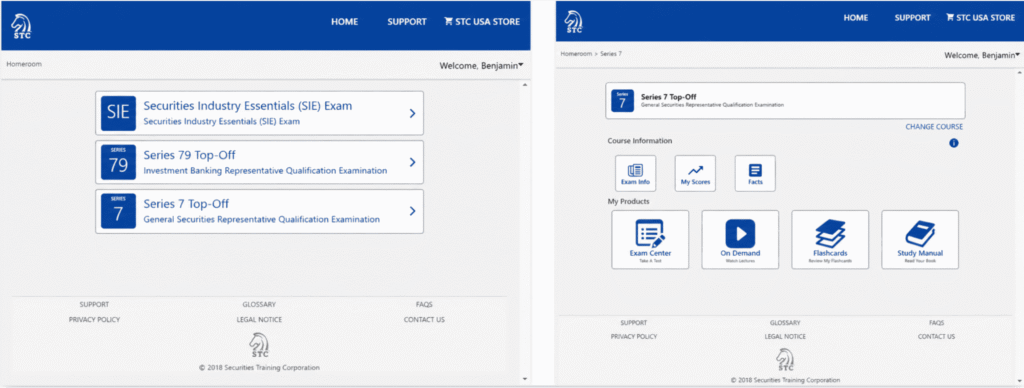
STC was pretty easy to figure out the first time I opened it. The manual was clearly the main part, and everything else followed the chapters. I would read a section, take its quiz, and keep going until I reached the larger exams. It felt like a normal class setup placed online. That made studying simple, although the Standard package felt stripped down once I saw what Premier added. Premier had the version of STC I would actually use. The lectures helped with dense chapters, and the extra exams gave me something between a tiny quiz and a full final.
Different Exam Stages
The exams had an order that actually made sense. I took Chapter Quizzes while the information was still fresh. Progress Exams came after several chapters and pulled older material back in, which caught me when I had already started forgetting something. I saved the Final and Green Light Exams for later because they covered much more at once.
That setup helped me understand what a bad score meant. A rough Chapter Quiz pointed to one section. A rough Progress Exam meant I needed to go further back. Standard only came with Chapter Quizzes and Final Exams, so the middle of the process felt empty.
On-Demand Lectures
The lectures were perfect to use when the manual started losing me. I would open the video covering that chapter, listen to the explanation, pause for notes, and try the quiz again afterward. Hearing someone talk through the topic made certain rules easier to follow than staring at another page of text.
They were also solid for a quick review. I could replay one part without starting the whole chapter over. My issue was that they only came with Premier and Premier Plus. Standard leaned heavily on the manual, so I would skip that package if reading is usually the part that makes you lose focus.
Virtual Class and Instructor Hotline
The Virtual Class gave me somewhere to take questions that needed more than another written explanation. I marked confusing parts while working through the manual, then listened for those topics during class. The recording helped when the instructor moved quickly, or I wanted to hear an example again.
The Instructor Hotline was better for one specific question. I could ask about the exact rule causing trouble without digging through an entire recorded session. Every package included the Hotline, which was one of STC’s better decisions. The live class was only in Premier Plus, so that package mainly makes sense for someone who will show up and use it.
Read my full STC review to see how its exam stages and instructor support held up.
STC Packages
| Package | What’s Included | Best For | Price |
|---|---|---|---|
| Series 3 Standard | Online and printed Study Manual, Chapter Quizzes, Final Exams, Instructor Hotline, Crunch Time Facts, tech support, and course updates | Confident textbook learners | See Pricing |
| Series 3 Premier | Everything in Standard plus Progress Exams, Green Light Exams, On-Demand Lectures, Flashcards, and the STC Pass Guarantee | Independent studying with video help | See Pricing |
| Series 3 Premier Plus | Everything in Premier plus the Instructor-led Virtual Class and recorded Live Virtual Class | Learning through scheduled classes | See Pricing |
STC Ratings
| Aspect | Rating |
|---|---|
| Content Quality | 9.4 / 10 |
| Practice Question Bank | 9.1 / 10 |
| Adaptive Learning Technology | 8.6 / 10 |
| Instructor Quality | 9.7 / 10 |
| Pricing and Value | 8.5 / 10 |
| Student Support | 9.6 / 10 |
| Overall Average | 9.2 / 10 |
Pros
✅ Crunch Time Facts made final review less overwhelming
✅ Flashcards gave me a break from the manual
✅ Course updates covered changes during enrollment
✅ Technical support stayed available around the clock
Cons
❌ The course never adjusted my schedule automatically
❌ Six months left little room for interruptions
❌ Some chapters still leaned heavily on reading
My Take on STC
I’d choose STC for the clear exam order and instructor access. The Premier package had the best mix for me, although the platform could use stronger study-planning tools.
3. Kaplan: Best for Keeping Series 3 Studying Organized

Kaplan was the course I opened when I wanted someone else to tell me what to do that day. I checked the Study Plan, saw the next assignment, and started there. The dashboard had a lot going on, so finding everything took me a few logins. After that, I had a pretty normal routine. I would finish the assigned reading or video, answer questions, and check my progress before logging off. It kept me moving on busy days. I still wish the dashboard felt cleaner because half the battle at first was remembering where Kaplan put each tool.
Study Plan
The Study Plan gave me weekly assignments based on my schedule. I opened it first and followed whatever Kaplan placed next instead of wasting time deciding between the manual, videos, and exams. That helped on days when I only had enough energy to sit down and start.
Missing a day made the schedule feel heavier, with unfinished work sitting beside new tasks. I wish Kaplan made it easier to rearrange the week without making everything feel overdue. The stricter schedule helped me focus, but real-life delays could throw off the flow fast.
SecuritiesPro QBank
I went into the QBank when one section kept hurting my scores. I picked that topic, chose how many questions I wanted, and made a short custom quiz instead of sitting through another full exam. Once I started improving, I mixed it with other areas to see whether I still knew it without expecting every question to cover the same thing.
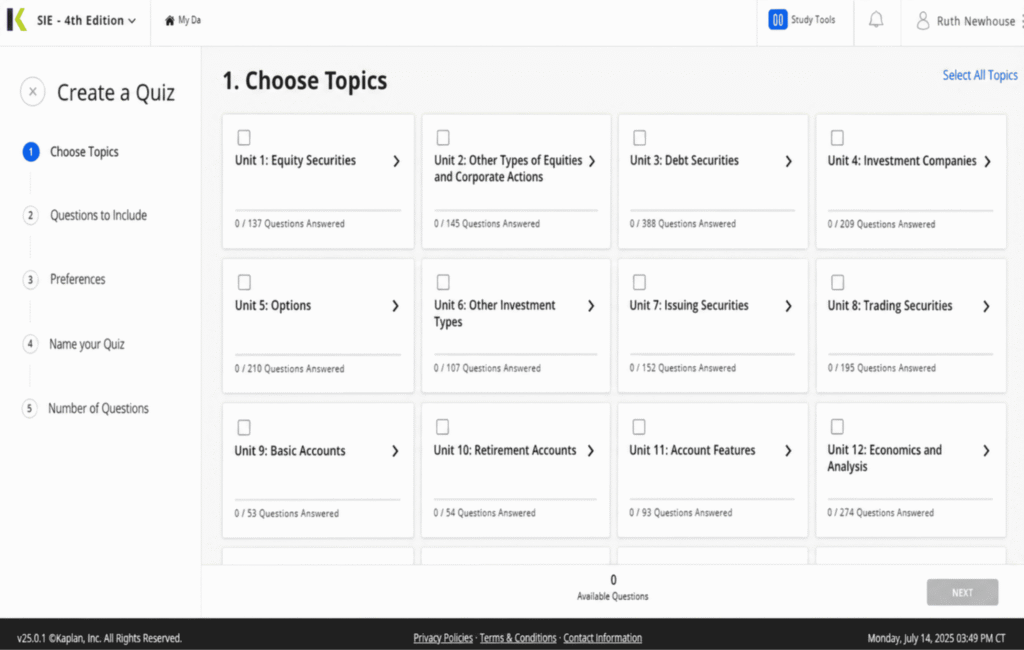
The explanations pointed me back to the manual, which saved me from searching through the whole book. I could keep creating new attempts, too. SIA made it easier to reopen only missed or marked questions, and I wish Kaplan had that same quick feeling. Kaplan gave me plenty of control, but creating a tiny quiz took more clicks than I expected.
Student Community
Kaplan’s discussion forum gave me a place to talk with instructors and other Series 3 students outside of class. I could search older conversations when I had a question or post my own and wait for help from the faculty. I also enjoyed hearing from people dealing with the same confusing topics and study stress. It made the whole process feel less lonely because I was learning alongside people who could actually relate.
Check out my full Kaplan review for a closer look at the Study Plan, QBank, and package options.
Kaplan Packages
| Package | What’s Included | Best For | Price |
|---|---|---|---|
| Premium Instruction Package | On-demand class, Class Notes, Mastery Exam, InstructorLink, Practice and Checkpoint Exams, Midterm, QBank, tracker, Study Plan, unit videos, manual, updates, and community | Full lessons with instructor help | See Pricing |
| Essential Self-Study Package | Practice Exam, Checkpoint Exams, Midterm, QBank, tracker, Study Plan, unit videos, manual, updates, and community | Following a plan without full classes | See Pricing |
| Basic Self-Study Package | Practice Exam, QBank, tracker, Study Plan, manual, updates, and community | Reading and building practice quizzes | See Pricing |
Kaplan Ratings
| Aspect | Rating |
|---|---|
| Content Quality | 9.4 / 10 |
| Practice Question Bank | 9.5 / 10 |
| Adaptive Learning Technology | 8.9 / 10 |
| Instructor Quality | 9.4 / 10 |
| Pricing and Value | 8.8 / 10 |
| Student Support | 9.2 / 10 |
| Overall Average | 9.2 / 10 |
Pros
✅ I could print or download my QBank exams
✅ The Midterm explained every answer afterward
✅ Unit videos made long chapters easier to start
✅ The manual came in print, PDF, and online
Cons
❌ The dashboard felt crowded during my first logins
❌ InstructorLink answers could take two business days
❌ Extra access required paying for an extension
Will Kaplan Work for You?
Kaplan kept my studying organized through the Study Plan and QBank. Five months goes by fast, so I’d wait to enroll until I was ready to start.
4. ExamFX: Best for Learning Through Videos and Quick Practice
ExamFX got me into questions pretty quickly. I would watch the assigned video, take the SpotCheck, and know whether I actually understood the lesson. The dashboard showed my chapter progress, scores, and Launch or Resume buttons, so finding my place was easy. I used it most when I wanted to study for a little while without turning it into a huge sit-down session. The videos and quick quizzes kept everything moving, although the practice tools could have used a few more detailed settings.
SpotCheck Quizzes
SpotChecks came right after the video lessons, which were honestly the most natural part of the course. I would finish a video thinking I understood it, then a question would change the wording and prove I missed something small. That saved me from watching several lessons in a row with fake confidence.
They were short enough to take immediately, so I never felt like I had to prepare for a whole exam. When I missed something, I could return to the lesson while the explanation was still fresh. I wish the Textbook Package included them because they worked as the link between learning a topic and taking the larger Checkpoint Exams.
Custom Exam Generator
I used the Custom Exam Generator after the Report Center showed a topic falling behind. I selected that area, made a smaller question set, and kept the session focused on the exact problem. Once the score came up, I mixed in other chapters to see whether I still knew the rule when I stopped expecting it.
The generator was simple to use, which fit the rest of ExamFX. SIA let me control details like incorrect, unseen, or marked questions, and I wish ExamFX went that far. Here, I could choose the material and build another exam, but the filters stayed pretty basic.
Final Exam Order
ExamFX built up to the Benchmark Final in a way I could follow. I started with SpotChecks and Practice Question Sets, moved into Checkpoint Exams, and took the Standard Finals after covering more of the course. I saved the Benchmark for the end because it was the final readiness check.
That order stopped me from opening the hardest exam too early and getting a score that meant nothing yet. I also used the Report Center between stages to see whether the same chapters kept dropping. The testing path was clear, although I wanted more feedback on what to study next after a rough score instead of choosing the next step myself.
Read my full ExamFX review to see how its faster study flow worked in real use.
ExamFX Packages
| Package | What’s Included | Best For | Price |
|---|---|---|---|
| Online Course Package | On-Demand Videos, eBook, hard-copy textbook, Study Plan, tracking, SpotChecks, question sets, Checkpoint, Benchmark and Standard Final Exams, custom exams, instructor support, Flashcards, and updates | Videos followed by quick practice | See Pricing |
| Textbook Package | Hard-copy textbook, Study Plan, tracking, question sets, Checkpoint, Benchmark and Standard Final Exams, custom exams, phone support, and updates | Reading and exam practice | See Pricing |
ExamFX Ratings
| Aspect | Rating |
|---|---|
| Content Quality | 9.1 / 10 |
| Practice Question Bank | 9.0 / 10 |
| Adaptive Learning Technology | 8.7 / 10 |
| Instructor Quality | 9.2 / 10 |
| Pricing and Value | 8.6 / 10 |
| Student Support | 9.0 / 10 |
| Overall Average | 8.9 / 10 |
Pros
✅ Phone support let me explain confusing questions aloud
✅ Flashcards gave me a faster way to review terms
✅ The glossary kept acronyms from slowing me down
✅ Real-time updates covered changes inside the course
Cons
❌ The Custom Exam Generator needed more filters
❌ The Report Center left me choosing my next step
❌ Harder topics sometimes moved too quickly
Is ExamFX Worth It?
ExamFX made the most sense when I wanted to watch something and practice it right away. The Online Course had the full experience I used. Anyone wanting deep exam controls may outgrow it, but the simple flow kept shorter study sessions from feeling pointless.
5. Knopman Marks: Best for Tracking Weak Areas
My first thought about this course was that they were really keeping an eye on my progress. The course felt supervised in a way the others did not. I had a clear path and regular follow-up that made it hard to quietly fall behind. Support also felt like a major part of the experience instead of something hidden in the dashboard. I always had somewhere to take a content question or a bigger problem with my study plan. That attention can be great for someone who needs accountability, although it may feel like too much for a very independent learner.
Predictive Analytics
The analytics became helpful after I had completed enough practice for patterns to show. Questions from weaker topics kept returning, which forced me to deal with the sections I would usually avoid. I could also build a custom set when one area needed extra work.
This kept my review focused on what was actually hurting my results. A random good score never erased the larger pattern. I could see which areas were improving and which ones still needed another round.
Performance Monitoring
Knopman continued tracking my work after I logged out. The reminders and progress emails showed how closely I was following the action plan. When I returned after missing a few study days, I could quickly see where I had stopped. Some emails felt unnecessary when I already knew I had skipped studying. Someone who hates reminders about unfinished work may get tired of them pretty quickly.
Onboarding and Action Plan
The onboarding call gave me a plan before I started working through the materials. It connected the textbook, videos, questions, and review work in an order that made sense. I followed that setup at first, then adjusted my routine as weaker topics appeared.
The private strategy calls helped when my whole schedule needed attention. Scheduling a call took more effort, so I saved those sessions for bigger issues with my progress or study plan.
Knopman Marks Packages
| Package | What’s Included | Best For | Price |
|---|---|---|---|
| Series 3 Exam Prep | One year of access, onboarding call, action plan, physical and digital textbook, video lectures, customizable questions, predictive analytics, supplemental resources, monitoring, reminders, faculty support, Client Experience help, and private strategy calls | Students who want performance-based guidance | See Pricing |
Knopman Marks Ratings
| Aspect | Rating |
|---|---|
| Content Quality | 8.8 / 10 |
| Practice Question Bank | 8.5 / 10 |
| Adaptive Learning Technology | 9.1 / 10 |
| Instructor Quality | 9.0 / 10 |
| Pricing and Value | 7.6 / 10 |
| Student Support | 8.6 / 10 |
| Overall Average | 8.6 / 10 |
Pros
✅ One year gave me room for delays
✅ I received physical and digital textbooks
✅ Supplemental resources added more review options
✅ Weak topics stayed visible during practice
Cons
❌ It was one of the more expensive options
❌ I could not choose another course format
❌ Frequent progress emails started feeling excessive
Is Knopman Marks Worth It?
Knopman fits someone who wants their scores to shape what they study next. The tracking and check-ins kept weak areas from being ignored. The cost may be harder to justify for someone who already manages their own progress well.
Other Series 3 Options I Would Only Use on the Side
These options can add something to your studying, but I would treat them as backup resources instead of replacing one of the five complete courses above.
- Mometrix: This study guide and practice test can give you another explanation of Series 3 topics. The setup is much lighter than the full courses I tested, so I would mainly use it for extra reading and questions.
- FIA Series 3 PassMaster: Unlimited timed tests and flashcard-style questions make this better for repeated practice. It is meant to supplement separate study materials, which leaves you responsible for finding your main instruction elsewhere.
- Brainscape: This is a quick way to drill futures terms and regulations from your phone. The available Series 3 decks are user-generated, so the quality and coverage can change from one set to another.
What Went Into Every Course Rating
I moved through all five courses as a student would. I opened the lessons, built quizzes, reviewed missed answers, used the reports, and tried the available support before scoring each one across the same six areas.
| Criterion | Weight | What I Evaluated |
|---|---|---|
| Content Quality | 25% | Accuracy, explanations, organization, and exam coverage |
| Practice Question Bank | 20% | Question variety, realism, explanations, and quiz controls |
| Adaptive Learning Technology | 15% | Weak-area tracking, reports, reminders, and study planning |
| Instructor Quality | 15% | Teaching clarity, course knowledge, lectures, and direct help |
| Pricing and Value | 15% | How much usable prep came with each package |
| Student Support | 10% | Faculty access, customer service, access time, and guarantee terms |
Series 3 prep has to balance market knowledge with regulations, so I wanted more than a manual with a final exam at the end. The courses earned higher scores when they made calculations easier to follow, gave me enough realistic questions, and showed which half of the exam was lowering my results. Tracking and support count too because knowing that a score is low means very little when the course gives you no clue what to do next.
Let Your Study Habits Pick the Course
Still unsure? Pick the line that sounds most like you.
- Want a complete mix of lessons and practice? → SIA
- Need direct help from an instructor? → STC
- Like building quizzes around weak topics? → Kaplan
- Prefer a simple lesson-to-exam routine? → ExamFX
Check These Details Before You Enroll
- Study format: Choose between reading, videos, or instructor-led lessons.
- Practice options: Check the quiz controls and missed-question tools.
- Package limits: Lower tiers may remove videos, exams, or instructor help.
- Access period: Leave room for delays in your study schedule.
- Guarantee rules: SIA and select STC packages have requirements.
The Series 3 Course I Would Choose After Testing
SIA ended up first because it gave me the fewest reasons to look elsewhere. I could read, watch a lesson, build a focused quiz, and use the Greenlight Exam when I was ready. The amount of material may be overkill for someone who only wants a quick review, but it worked well as a full Series 3 course.
STC came closest when instructor help was the priority. Kaplan had the practice control I wanted, ExamFX kept the process simple, and Knopman Marks offered the most follow-up. None of them were bad. They just fit very different study habits.
If you are ready to enroll, compare pricing at Securities Institute of America and Securities Training Corporation.
FAQs
What is the best Series 3 prep course?
SIA was my top pick because it combined video lessons, a textbook, custom practice, and readiness exams. STC may fit better if you want live instruction.
How long should I study for the Series 3 exam?
Most students should plan for around 30 to 70 hours. Your timeline may be longer if future calculations and regulations are completely new to you.
Is the Series 3 exam hard?
It can be. The calculations, detailed regulations, and tight timing cause the most trouble. You also need to pass both parts instead of relying on one strong section to carry your score.
What score do you need to pass the Series 3?
You need at least 70% on both parts of the exam. A high score on one part cannot make up for failing the other.
What should I score on Series 3 practice exams before testing?
Aim for consistent scores around 80% rather than relying on one good attempt. You should also be able to finish full practice exams within the real-time limit.