Our Kansas City Royals app is getting a new home
Dear sports fans,
We’re retiring our True Blue app so we can provide you with an improved digital experience. Our exclusive KC Royals content will move to a new home where we will continue to share news, features and updates.
Here’s how to access the best Royals coverage:
- Sign up for our free email newsletter.
- Download the KC Star app for iPhone and iPad or Android.
- Visit us on the web on your desktop or mobile device.
- For readers who head right to our sports content before anything else, your best, most affordable option (less than 10 cents a day) is to subscribe to The Kansas City Star's Sports Pass. You can enjoy every sports-related piece of content we publish with Sports Pass for $30 a year. Sports coverage is included for KC Star subscribers.
Thank you, and keep reading (and rooting).
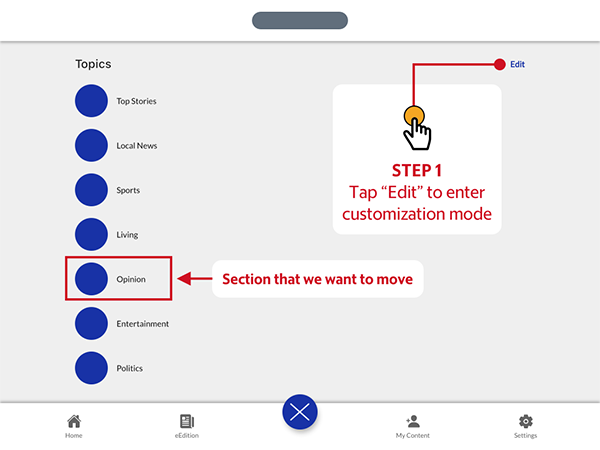
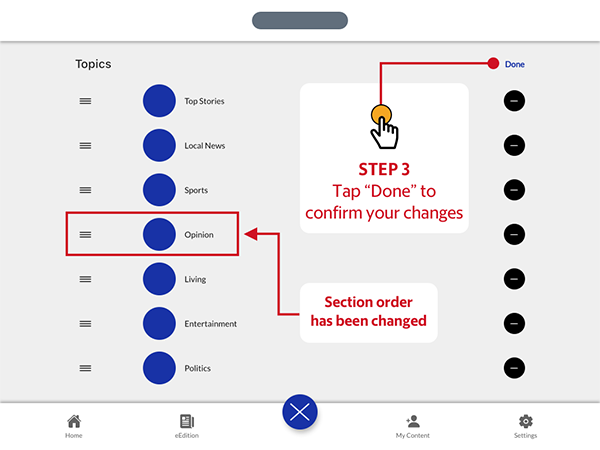
Jeff Rosen Sports Editor, The Kansas City Star Coverage of the Royals can be found under the Sports section in the KC Star app. Download the app for iPhone and iPad or Android. If you already have the app, make sure you've updated to the latest version. Tap the large blue circular button located toward the bottom of your screen to open the Topics screen. From there, tap the “Edit” button in the top right corner of the screen. To change the order of the topics, tap and hold the grabber icon on the left of the topic label to lift it up and out of the list, then drag it up or down to adjust the order. The other topic labels will make way for your selection, allowing you to drop the label when you find the right spot. When you are satisfied with your topic order, tap the “Done” button in the top right corner of the app screen to return to the Topics screen. Additionally, you may also tap the blue circular button toward the bottom of the screen, which will now display a white “X” in the center, to immediately return to the Home Feed screen. For more information on how to use the app please see our user guide, If you need additional assistance, please contact customer service
HOW TO FIND ROYALS COVERAGE IN THE KC STAR APP