

The ARE® 5.0 is not the kind of exam I would wing and hope for the best.
Here’s the reality:
NCARB reported a 55% overall pass rate across ARE 5.0 divisions in 2024, meaning nearly half of all candidates don’t pass. The right study setup can make a real difference.
So… which prep course actually gives you the best shot?
I took a closer look at the top ARE prep programs to break down what works, what doesn’t, and who each one is best for. Let’s get into it.
Which ARE Prep Course Is Best for You?
Answer 8 quick questions about your ARE 5.0 progress, study style, and biggest exam challenges. We’ll match you with the course that fits you best.
No email required.
Which ARE Course is for You?
- School of PE: Best for guided ARE prep with lectures, instructor notes, and direct support.
- PPI2Pass: Best for text-based learning with the Ballast manual and a clear study plan.
- Young Architect: Best for NCARB-focused study with case studies and Virtual Tutor support.
- Amber Book: Best for visual learning with animated lessons and Panic Notes.
- Architect Exam Prep: Best for simple study guides with graphics and division-based review.
- Designer Hacks: Best for extra practice exams after reviewing the material.
| Best ARE® Prep Courses | ||
 |
| REVIEW |
 |
| REVIEW |
 |
| REVIEW |
 |
| REVIEW |
 |
| REVIEW |
 |
| REVIEW |
1. School of PE – Best for Complete, Guided ARE Prep

School of PE has the closest thing to an actual online class setup. I could watch a lecture, keep my instructor notes open beside it, and send a question through Instructor Connect if something still did not click. The videos are more traditional, but I liked having a slower walkthrough when I needed time to take notes.
School of PE’s Lecture Videos
I clicked into one of the lecture videos, expecting the usual slideshow situation where someone reads the same words already sitting on the screen. The instructor actually worked through the topic and added examples along the way, so I was not just staring at slides and pretending it counted as studying.
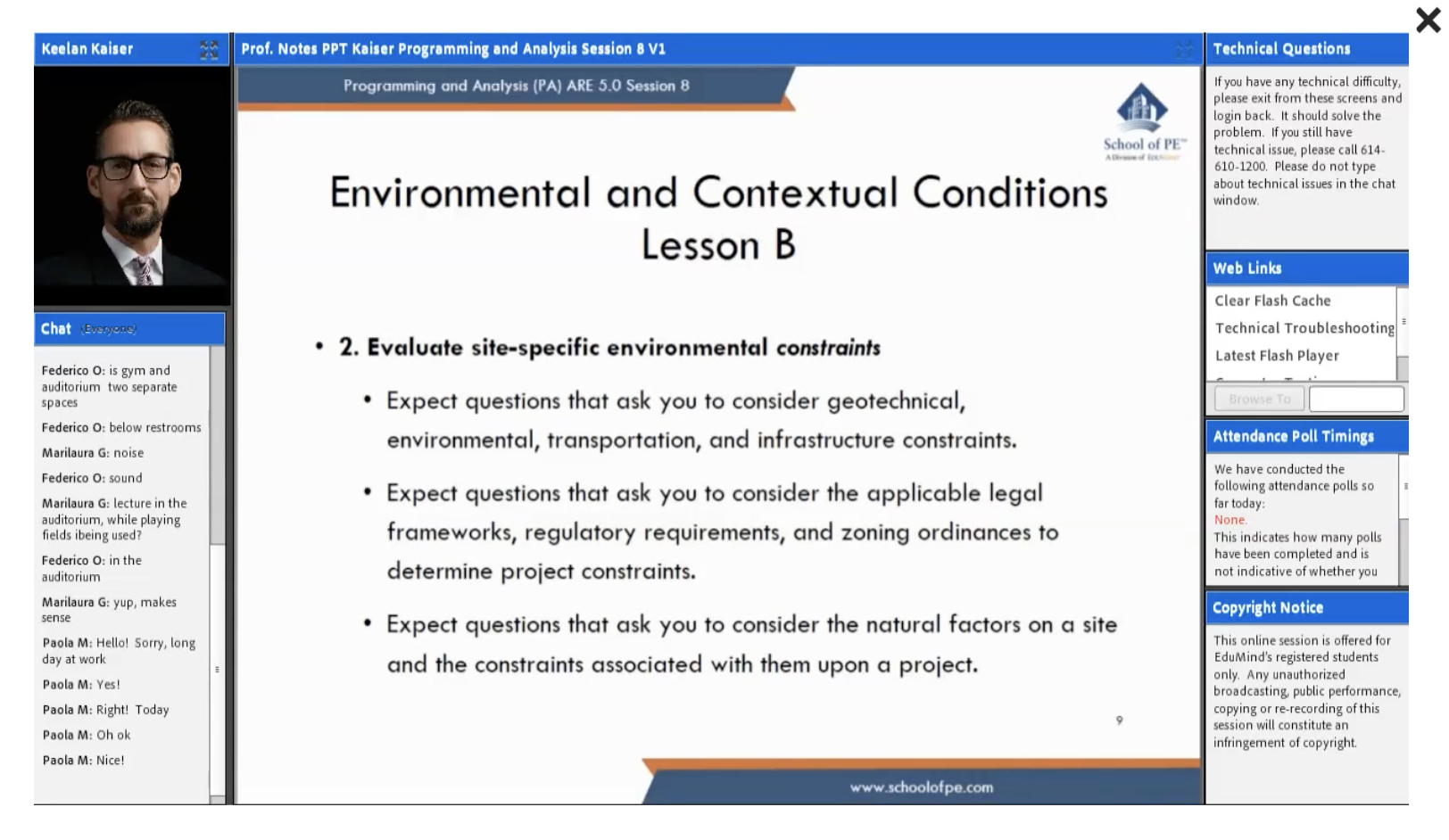
I paused a few times to write things down, then jumped back in exactly where I stopped. The videos are definitely more traditional than the shorter lessons in courses like PPI2Pass. I would open School of PE when I wanted a slower walkthrough and more time to take notes as the instructor worked through the topic.
School of PE’s Instructor-Prepared Course Notes
The instructor-prepared notes are the kind of resource I would keep open beside the lecture. I could follow along without panic-typing every sentence, then go back over the same section after the video ended.
They also read like actual class notes, not a random PDF tossed into the package to make the feature list longer. I could skim them again on days when replaying a full lecture sounded miserable.
School of PE’s Instructor Connect
Instructor Connect was the most useful extra for me. I could send a question directly to the teaching team instead of opening a million tabs and hoping one random explanation finally made sense.
That is perfect to have when the lecture and notes cover most of a topic, but one weird detail still doesn’t click. The only catch is that Instructor Connect is not included with monthly courses, so the shorter plan loses one of the better reasons to pick School of PE.
School of PE Packages
| Access | What It Includes | Best Fit |
| 1-Month Subscription | On-Demand lectures, instructor-prepared notes, Study Hub, and discussion forum | Short-term review |
| 12-Month Access | Full On-Demand course plus personalized study plan and Instructor Connect | Full ARE prep |
Pros
✅ I could pause lectures, take notes, and jump back in easily.
✅ The notes saved me from panic-typing through every lesson.
✅ Instructor Connect gave me a place to ask the weird follow-up questions.
✅ The bundle covers all six divisions.
Cons
❌ The lecture style is a little old-school.
❌ Instructor Connect is not included with monthly courses.
❌ I would not open a full lecture for a quick refresher.
Is School of PE Best for You?
School of PE works best for class-style ARE prep. I could watch a lecture, keep the instructor notes nearby, and send questions through Instructor Connect when something was not clicking. The videos are a little old-school, but the extra support makes the course easy to follow.
School of PE
2. PPI2Pass – Best for Text-Based Learning

The first thing I noticed with PPI2Pass was that I was never left guessing what to do next. The study plan gave me a clear place to start, and then the diagnostic exams showed me where I was actually struggling.
I could open the matching Ballast section, review what I missed, and go back into practice. There is a lot inside the Learning Hub, but it stopped feeling overwhelming once I followed the order it laid out.
David Ballast’s ARE 5.0 Exam Review
The Ballast manual was the best part of the setup for me. It is the main reference book inside PPI2Pass, and after the diagnostic flagged project development, I could go straight to that section and focus on the tables and examples that covered the parts I was shaky on.
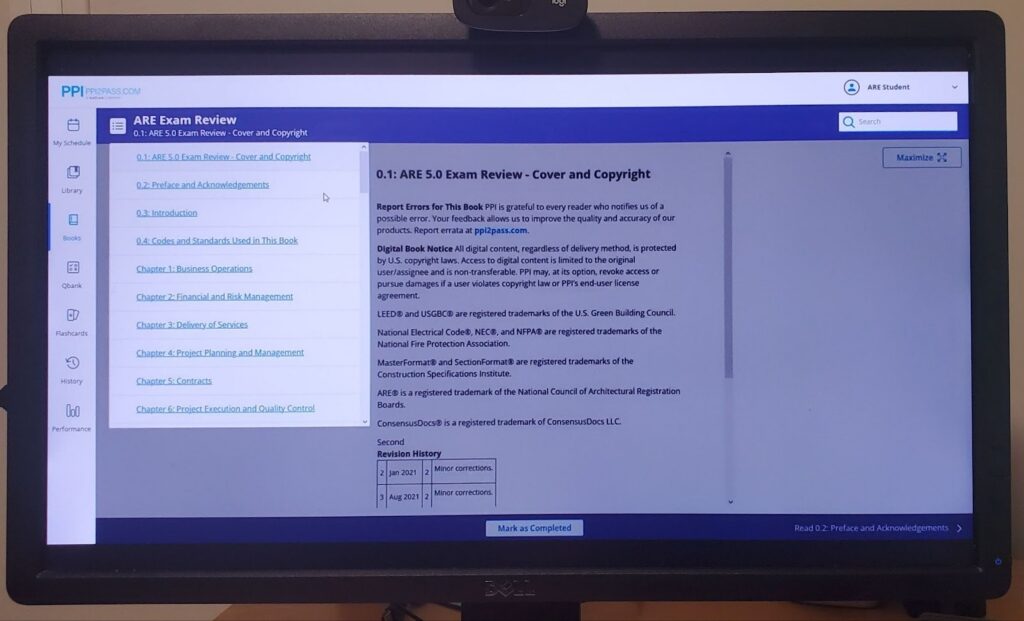
That worked better for me than rereading a full chapter just because it was next in order. The manual is dense, but it is easy to use as a reference when I already know what I am looking for.
PPI2Pass’s Diagnostic Exams
The diagnostic exam was the part that made the rest of the course easier to use. I could see pretty quickly that project management and project development needed more work before wasting time reviewing sections that were already fine.
I liked having an actual reason for what I opened next. I could review the weaker topic, answer more questions, and see whether it was finally sticking instead of clicking through lessons at random.
PPI2Pass’s ARE Video Series
I watched the video series in between practice exams when I needed a break from answering questions, but did not want to stop studying completely. The videos were easy to sit through, so I could watch a few at a time without turning it into a whole lesson marathon.
After that, I would open a quiz and see what I actually retained. Using the videos that way gave me a quick reset between practice sets while still walking through harder topics step by step.
PPI2Pass Packages
| Access | What It Includes | Best Fit |
| Learning Hub Subscription | Ballast web book, diagnostics, study calendar, videos, practice questions, and flashcards | Full online study plan |
| Print Bundle | Ballast manual, practice questions, mock exams, and flashcards | Print-heavy review |
Pros
✅ The diagnostic showed me exactly where to go back.
✅ I could use the Ballast manual without rereading everything.
✅ The videos were easy to work on between practice exams.
✅ The study plan kept the next step obvious.
Cons
❌ The catalog took me a minute to sort through.
❌ The Learning Hub does not have a dedicated app.
❌ The Ballast manual is thorough, but it can feel dense.
Is PPI2Pass Worth It?
PPI2Pass is an excellent pick if you need a course that tells you what to study next instead of making you figure it out on your own. The Ballast manual is dense, but the diagnostics made it way less intimidating. I would pick this setup when I want a more thorough plan and do not mind spending a little time inside the platform.
PPI2Pass
3. Young Architect – Best for NCARB–Focused Prep
Young Architect was one of the least overwhelming platforms to open. The layout is clean, the lessons are broken up well, and I did not have to dig through a huge course library to figure out where anything was. Everything is built around NCARB objectives, so the content stays close to what is actually being tested.
I also liked that it does not pretend that every topic needs a massive lecture. I could watch a shorter lesson, work through questions, and use the Virtual Tutor when one detail still did not make sense. The whole setup feels practical and a little more down-to-earth.
Young Architect’s Virtual Tutor Support
I used the Virtual Tutor when I got stuck on a question and could not tell whether I missed the whole concept or one small detail. That is usually where I end up opening five tabs and making the topic more confusing than it was to begin with.
I could ask the follow-up question while I was still inside the course and get a quick explanation without derailing the whole study session. It worked best for the random questions that popped up while I was already moving through a lesson or practice set.
Young Architect’s Case Studies
The case studies were better than answering another random batch of questions because they forced me to stay inside one scenario and actually apply what I knew. I could work through the documents, answer the questions, and see where I started second-guessing myself once the information was not handed to me in a perfect little order.
That made them a good reality check. I might understand a topic on its own, then realize I was slower once I had to pull the right detail from a real example. They added a different kind of practice without making the course feel repetitive.
Young Architect’s Interactive Video Lessons
I watched the video lessons in shorter chunks, usually before opening more questions. They were easy to sit through because the explanations did not drag everything into a full classroom lecture. I could watch a few, answer questions right after, and see whether the topic actually stuck.
That worked especially well for the more technical material. If I missed something, I could go back to the exact part I needed instead of replaying a giant lesson from the beginning. The videos are not flashy, but they are easy to use consistently.
Young Architect Packages
| Access | What It Includes | Best Fit |
| ARE 101 Membership | All six exam courses, video lessons, practice questions, case studies, flashcards, and bonus courses | Self-paced ARE prep |
| ARE Boot Camp | 10-week syllabus, weekly coaching, online study group, milestones, and extra materials | More accountability |
Pros
✅ The bonus courses cover contracts, codes, and mechanical systems.
✅ The 1,400+ questions give me plenty of practice before exam day.
✅ AHPP reading companions make the heavier material easier to work through.
✅ Boot Camp adds weekly coaching and a small study group.
Cons
❌ I had to click around a little before I understood how the courses were split up.
❌ Some of the videos looked more basic than I expected.
❌ I wanted more detail in a few of the answer explanations.
Who Is Young Architect Best For?
Young Architect is a good fit if a huge course library gets overwhelming fast. Some of the videos look a little basic, but the platform is easy to move through, and the case studies helped me catch where I was still guessing. Boot Camp adds more accountability if the self-paced setup feels too open.
Young Architect
4. Amber Book – Best for Visual Learners

Amber Book was one of the easiest courses for me to keep opening because the lessons were actually interesting to watch. The animations made the material less dry, and I could work through a few videos without feeling like I had just sat through a long lecture.
I also liked that there were different ways to review depending on how much energy I had. Some days I watched a full lesson. Other days, I pulled up the Panic Notes and kept it lighter.
Amber Book’s Animated Video Lessons
The animated videos were the main reason I kept coming back to Amber Book. I could watch a topic get explained on screen while the visuals moved with the lesson, which made it easier to follow without zoning out halfway through.
I liked doing a few videos at a time, then going back into practice while the topic was still fresh. The lessons were easy to sit through, and the animation gave me something to focus on besides a wall of text.
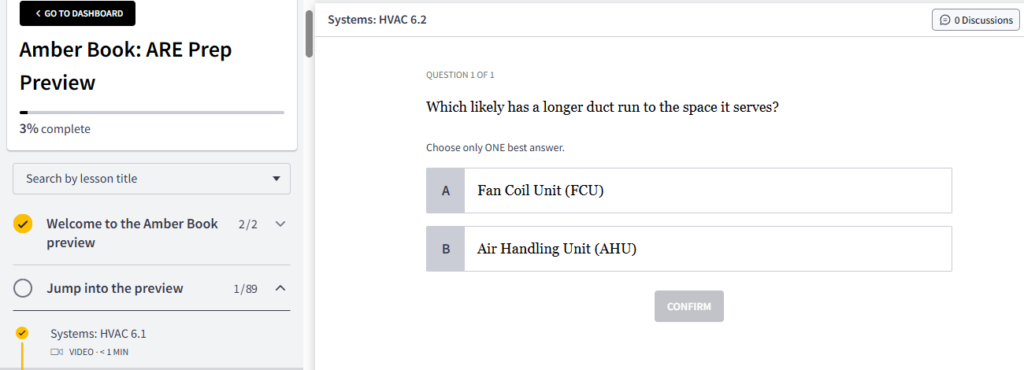
Amber Book’s Panic Notes
The Panic Notes were perfect for days when I wanted a quick review before jumping back into questions. I could skim the main points, remind myself what the topic was about, and move on without replaying a full lesson.
I liked having something shorter to pull up when I was tired or low on time. They were simple, but that made them easy to use without turning one topic into a whole study session.
| Access | What It Includes | Best Fit |
| Monthly Subscription | Animated videos, practice questions, flashcards, Panic Notes, Amber Hive sessions, and an illustrated workbook | Visual study with live support |
Pros
✅ Best animated video content out of all courses
✅ Panic Notes gave me a quick way to review.
✅ The illustrated workbook adds another way to go back over the material.
✅ The 700+ flashcards make short review sessions easier.
Cons
❌ The monthly cost can climb if the timeline stretches out.
❌ The topic-based layout takes a little time to get used to.
❌ There is no offline option for reviewing away from Wi-Fi.
Is Amber Book a Good Fit?
Amber Book is a good fit for visual learning. The animated lessons made the course easy to keep up with, especially when I was tired of reading.
Just keep the monthly pricing and topic-based layout in mind.
Amber Book
5. Architect Exam Prep – Best for Graphic Study Guides
Architect Exam Prep was easy to get into because the study guides did most of the work. I could open one division, skim the graphics, and find the section I needed without digging through a huge course library first.
The setup is pretty simple. It is more of a focused study companion than a giant all-in-one platform, which honestly works here. The guides, practice modes, and coaching options give it enough depth without making the whole thing feel like another full-time job
Architect Exam Prep’s Graphic-Heavy Study Guides
The study guides were the first thing I noticed. They are packed with diagrams, charts, and visuals, so I could skim a page and understand the main point before reading every line.
That helped when I was reviewing denser topics and did not want another wall of text. I could go back to one graphic, look over the section again, and move on without replaying a whole lesson. The guides feel clean and easy to use, especially when I only need to refresh one part of a division.
Architect Exam Prep’s Practice Modes
I liked that the questions were split into quiz, test, and mock exam modes. I could use a shorter quiz when I only had a few minutes, then switch to a longer test once I wanted to see how much I actually remembered.
The mock exam mode made the practice feel more useful than clicking through random questions. It gave me a better idea of where I was still hesitating, especially after reviewing the study guide first.
Architect Exam Prep’s Platinum Coaching
The Platinum Coaching option adds a little more support without changing the whole course setup. I could see this making sense when the study guides are working, but I still need someone to help me stay on track or talk through what to focus on next.
It is more personal than the regular self-paced setup, so it gives the course another lane without making the basic package feel incomplete.
Architect Exam Prep Packages
| Access | What It Includes | Best Fit |
| Per-Division Access | Study guides, practice questions, and video content for one exam | One division at a time |
| All-Access Membership | Access to every division | Studying for several exams |
| Platinum Coaching | Extra support and accountability | A more hands-on plan |
Pros
✅ The guides were easy to skim when I only needed one section.
✅ The graphics broke up the heavier pages.
✅ I liked having quiz, test, and mock exam modes.
✅ The all-access plan covers every division.
Cons
❌ Some pages had a lot going on visually.
❌ I wanted a little more detail after a few missed questions.
❌ The videos looked more basic than the study guides.
Should You Try Architect Exam Prep?
Architect Exam Prep kept things pretty simple for me. I could pull up one division, flip through the guides, and run a quick quiz without turning it into a whole study production. Some pages had a lot going on, but the graphics still made the heavier stuff easier to get through.
Architect Exam Prep
6. Designer Hacks – Best Supplemental Practice Exams
Designer Hacks is a practice exam platform; it’s not a comprehensive course. I’m not knocking it, I’m just stating a reality. But it does what it does very well. It provides unlimited access to randomized mock exams in three different formats, all organized by NCARB content categories. Their All In ARE 5.0 bundle covers all six divisions, and the questions are randomly pulled from a library that represents more than three exams’ worth of content per division, so you’re never just cycling through the same set.
Designer Hacks’ Three Practice Formats
The three quiz lengths made it easy to match the practice to how much time I had. I could do a 10-question set when I only wanted a quick check, open a 25-question quiz when I had more time, or use the timed mock exam when I wanted something closer to the real thing.
I liked using the shorter sets after finishing a section, then saving the timed version for later. It kept me from turning every practice session into a full exam.
Designer Hacks’ Randomized Mock Exams
The questions are pulled from a larger library each time, so I was not memorizing the same quiz order after a few tries. I could retake a division and still run into questions I had not just seen five minutes earlier.
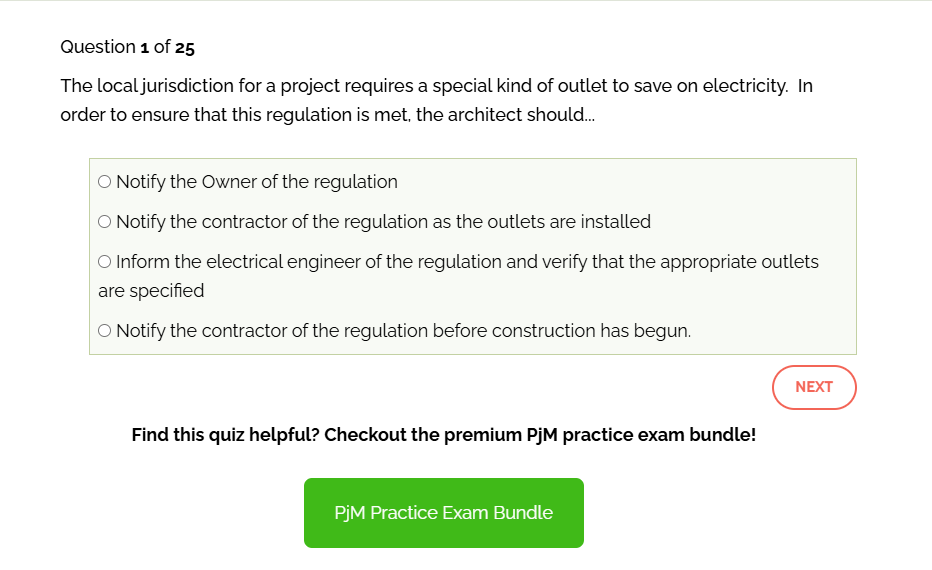
That made the repeat attempts more useful. It was easier to tell whether I actually understood the topic or only remembered the answer from the last round.
However, if you want video lessons, detailed explanations, or instructor support, move along. The feedback is automatic and pretty basic. Designer Hacks is a good value for extra practice, but may not be enough on its own.
Designer Hacks Packages
| Access | What It Includes | Best Fit |
| Per-Division Bundle | Three practice formats for one exam division | Extra practice for one test |
| All In ARE 5.0 | Practice exams for all six divisions with unlimited retakes | Practice across the full ARE |
Pros
✅ I could fit a 10-question quiz into a short study break.
✅ The timed mock exam gave me a better final check before moving on.
✅ Unlimited retakes make the one-time purchase easy to keep using.
✅ The all-in bundle covers every division.
Cons
❌ Some answer explanations were pretty basic.
❌ I wanted a little more detail after a few missed questions.
❌ The interface is simple and not very polished.
Is Designer Hacks Right For You?
Designer Hacks works best as an extra place to practice. I liked being able to run a short quiz or a full mock exam without opening a huge course. The explanations can be basic, but the unlimited retakes make it easy to keep using.
Designer Hacks
Other ARE Prep Courses Worth Checking Out
Here are a few more that didn’t make my best of list, but that doesn’t mean I’m counting them out:
- Black Spectacles: Covers all six divisions with ARE-style practice exams, videos, flashcards, and a Guided Study Process. The exam setup is one of the more realistic options.
- ARE Questions: Includes question bundles by division with detailed explanations and 12 months of access. It is a solid option for extra practice after a missed question needs a deeper breakdown.
How I Picked the Best ARE 5.0 Prep Courses
I spent time inside each course and ranked them based on the parts that actually affect studying. I looked at the lessons, practice questions, platform setup, support options, and overall value. The weights reflect what I found most important while testing them.
| Category | Weight | Evaluation Criteria |
|---|---|---|
| Content Coverage & Accuracy | 25% | Coverage of all six ARE divisions; alignment with current NCARB objectives and exam specs |
| Instruction Quality | 20% | Quality of video instruction, explanations, and teaching methodology |
| Practice Question Depth | 20% | Volume, difficulty calibration, and quality of feedback/explanations |
| Study Tools & UX | 15% | Flashcards, diagnostics, adaptive planning, mobile access, platform usability |
| Support & Access | 10% | Instructor access, live sessions, community, response quality |
| Value & Flexibility | 10% | Pricing transparency, subscription options, and guarantees |
Which ARE Prep Course Is Right for You?
Still stuck between a few options? Start with the way studying usually goes in real life.
| If You Need… | Start With | Why It Fits |
| More guidance | School of PE | Lectures, instructor notes, and Instructor Connect work like an online class. |
| A study plan | PPI2Pass | The study plan and diagnostics point back to weaker topics. |
| More visuals | Amber Book | The animated lessons and Panic Notes make review easier to keep up with. |
| NCARB-focused prep | Young Architect | The lessons, Virtual Tutor, and case studies keep the setup focused. |
| Simpler study guides | Architect Exam Prep | The guides and graphics make dense sections easier to review. |
| More practice exams | Designer Hacks | The short quizzes and mock exams make extra practice simple. |
My Final Take
The best ARE 5.0 prep course really comes down to what makes studying easier to stick with.
School of PE is the easiest one to recommend for a more hands-on study setup. The lectures, instructor notes, and Instructor Connect all work together without making the course feel complicated. PPI2Pass also covers a lot of ground, especially with the Ballast manual and diagnostic exams. Amber Book makes more sense for visual learning, while Young Architect keeps things simple and NCARB-focused. Designer Hacks is best saved for extra practice questions.
FAQs
A good ARE 5.0 study plan should include lessons, practice questions, and regular review. The right format depends on how the material sticks best, whether that means videos, written notes, case studies, or more structured support.
Yes. The ARE 5.0 covers six divisions, and each one tests a different part of architectural practice. The exam requires more than memorizing terms, so practice questions and case studies matter.
There are six ARE 5.0 divisions: Practice Management, Project Management, Construction and Evaluation, Programming and Analysis, Project Planning and Design, and Project Development and Documentation.
Study time varies by division and experience level. A few weeks may be enough for a familiar topic, while the technical divisions can take longer. A realistic schedule matters more than trying to rush through every exam.
Yes. Practice exams help show which topics still need work and make the real test format feel less unfamiliar. They work best when paired with review materials so missed questions turn into a clear next step.


![PPI2Pass Review [FE and PE Exam Prep Courses]](https://www.kansascity.com/careers-education/wp-content/uploads/sites/7/2025/10/PPI2Pass-Review-feature-img.png)


